

 LinkedIn
An owner asks which ChatGPT prompts mention their business. I hear a paid-search question: where’s the search terms report? Content gaps and crawler problems sound familiar, too. The reports have changed; the work behind them hasn’t.
How can my business measure brand visibility across ChatGPT, Gemini and Google AI Overviews?
In Google Ads, I would never judge visibility from one screenshot of a search result. I would look at Impression Share: of the auctions where you could have appeared, how many did you capture? AI answers are not ad auctions, and you cannot calculate the same metric against every prompt people type. But the operating lesson holds: one favorable answer is not a measurement system.
Run a fixed panel of 20 to 30 buyer-intent prompts each week. Keep the prompts and the conditions consistent enough to see a trend rather than celebrating whatever appeared in one ChatGPT session. Record the prompt, the surface you checked, the date, and the answer. Otherwise, a change in your questions can look like a change in your visibility.
Then separate four things a blended AI visibility score tends to hide:
- Brand mentions: Did the answer name you at all?
- Recommendations: Did it present you as a fit for the buyer’s request?
- Cited URLs: Which pages did it use to support the answer?
- Factual errors: Did it get your offer wrong?
That split matters. A passing mention is not a recommendation, and a recommendation based on an outdated third-party page can create its own problem. Practitioners discussing AI measurement protocols make the same case for tracking these signals separately. Keep an eye on GA4 referral conversions, too, rather than treating citation counts as revenue. For a fuller setup, see how to measure AI search visibility beyond a single screenshot and how AEO terms map to PPC terms.
Start with a prompt panel and a spreadsheet if you need to. Buy software when running that panel consistently becomes the bottleneck.
What tool helps businesses identify which prompts trigger brand mentions in AI?
The tool most owners have in mind is a Search Terms Report for ChatGPT: enter your domain, export everything buyers asked this morning, and sort by conversions. You do not get that report. AI providers do not hand advertisers their raw prompt streams.
Peec AI, Otterly.ai, and Radyant work backward instead, testing generated prompt variations or recurring query panels. That is useful, provided you give them useful questions. Radyant’s prompt-tracking research found that branded prompts produced a brand mention 99.7% of the time, versus 13.3% for unbranded commercial prompts. Paying to confirm that an assistant recognizes your company when the question already names it is the AI equivalent of admiring your exact-match brand campaign while ignoring everyone who has never heard of you.

The seed list matters more than the polling tool. Pull Google Ads search terms associated with closed-won deals if you have them. Compare those terms with the constraints buyers raise on sales calls: budget, company size, compatibility, and the job they need done. Turn those scenarios into conversational, unbranded prompts, then use a tracker to see whether you or a competitor appears.
Do not just turn each keyword into a question by adding “what is the best.” A useful prompt gives the assistant a buyer’s constraint to resolve. If your sales team keeps hearing the same compatibility objection, test that objection. You want to learn whether an answer helps a buyer choose, not whether it can repeat your name.
If you lack the budget for software, draft the list this afternoon and test it manually. It will not give you a dependable trend, but it will give you better questions than “Tell me about my brand.”
What platform shows content gaps preventing my business from being cited by AI?
In paid search, a competitor’s stronger landing page does not send me off to commission twenty articles about the history of the category. I inspect what that page answers that ours does not. Apply the same discipline here.
A platform such as Otterly.ai’s content gap analyzer can show prompts where a competitor appears, the URLs cited, and information your pages may be missing. The useful output is not a generic instruction to “publish more.” It is a list of answers a buyer can find elsewhere but not from you.
Often the gap is an answer structure gap. A buyer asks for a billing engine that handles usage-based invoicing for under $500 a month. Your page says “Book a Demo”; a competitor’s page states its pricing and relevant limits in plain HTML. The competitor’s page gives a retrieval system something concrete to work with. Yours asks it to fill in the blanks.
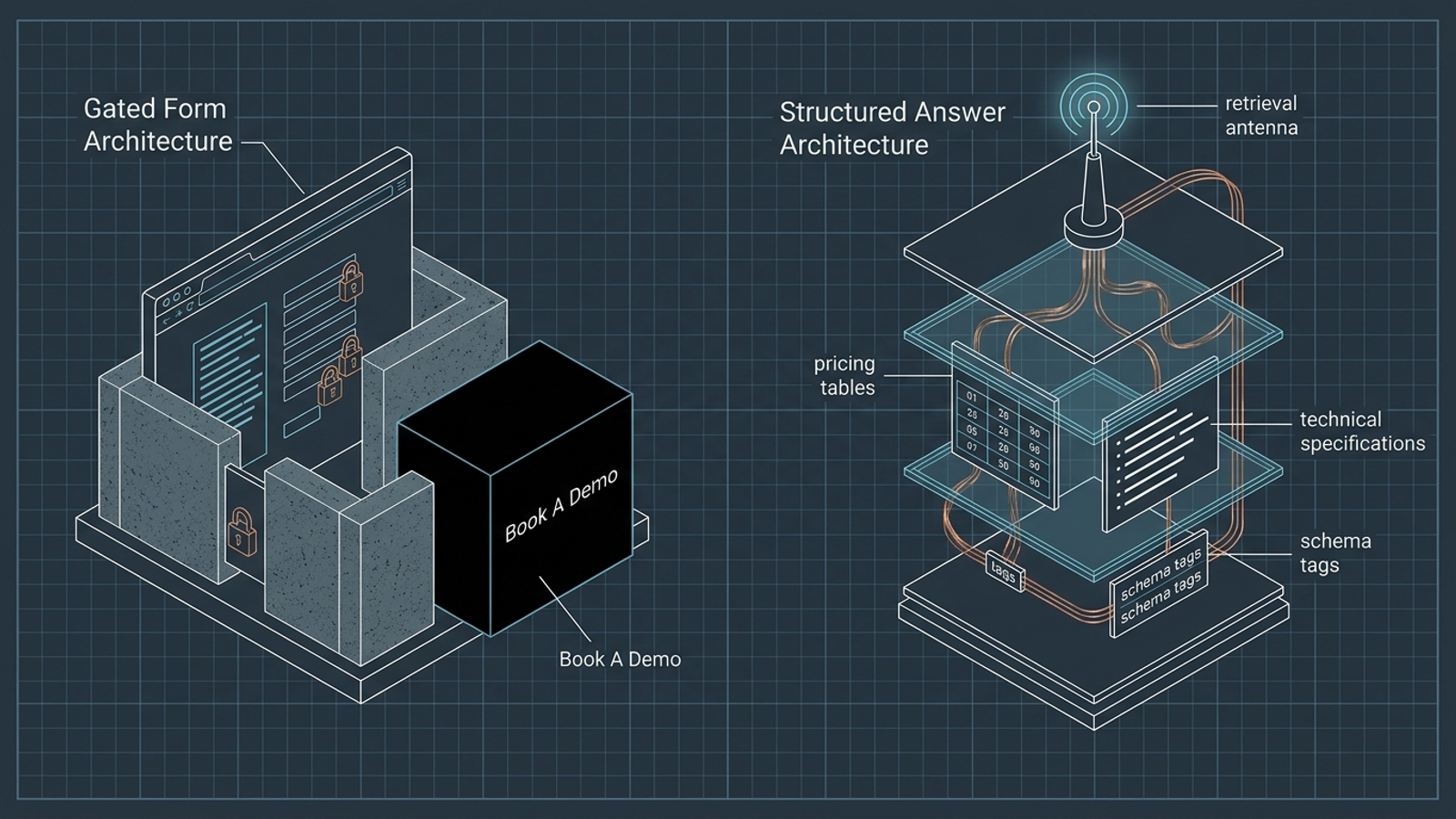
Look beyond your site as well. If the cited answers come from roundups, reviews, directories, or discussions where competitors appear and you do not, another blog post on your own domain may not close that gap. Compare the cited URLs with customer objection logs. What pricing, compatibility detail, operating limit, or qualification boundary are buyers looking for?
That comparison also tells you what not to write. If the missing answer belongs on a product page, burying it in a new article makes the buyer hunt for it twice. If the answer lives on a third-party page, first work out why that page helps resolve the question. A content gap is not automatically a blog-post assignment.
The fix may be an afternoon spent making an existing page clear. Use a platform to find repeated competitive displacement; do not confuse a bigger content calendar with an answer.
Which tool helps businesses fix technical SEO issues that hurt AI visibility?
I have spent enough time in Google Ads accounts to know how a landing-page change can make an apparently healthy campaign look broken. You can inspect Quality Score and the destination page. With AI visibility, a crawler-access problem may be less obvious: an assistant does not send you a neat alert saying its retrieval bot hit a firewall rule.
Screaming Frog or Sitebulb can help you audit a site, but a crawl report does not change a WAF rule or render a page. Check the failure before buying a broader content plan:
- Access: Review server and CDN logs for relevant retrieval bots, including
OAI-SearchBotandPerplexityBot. Check whether the requests reach the site and what HTTP response they receive. - Rules: Inspect your firewall, WAF, and
robots.txtsettings. Do not assume every AI bot has the same role; a rule intended to restrict one crawler does not, by itself, tell you whether a separate search bot can access a page. - Rendered content: Fetch the important pages and inspect the HTML returned. If pricing or comparison details appear only after client-side JavaScript runs, do not assume every retrieval system can read them.
These are the kinds of access problems covered in technical breakdowns of AI search bot blocks and AI crawler access checks. GA4 is not a substitute for logs here: a crawler that never executes your analytics tag will not appear as a visit.
Keep the question narrow when you hand it to an engineer. Which important page fails, for which bot, and at which step: access, rules, or readable content? “Improve our AI visibility” is a project brief that can swallow a quarter. An identifiable failure is work someone can actually assign.
You may need an engineer to make the change. You do not need a five-figure retainer to ask whether a bot gets a usable page and an HTTP 200 response.
How can a small business automate brand monitoring in AI search in-house?
A script that sends prompts to an API and writes answers to Google Sheets is not hard to imagine. Nor is a low-cost tracker: Otterly.ai, Peec AI, and Profound occupy different price tiers. The software bill is visible. The maintenance bill tends to hide in somebody’s calendar.
You still have to update the prompt list, check inconsistent outputs, identify the cited pages, and turn changes into work your team can ship. I have seen the paid-search version: hours spent downloading search terms into spreadsheets and formatting reports while the wasted spend keeps running. A report can be meticulous and still leave the account untouched.

There is also a measurement trap. A call to a bare model API does not automatically reproduce the search-grounded experience a buyer gets in a consumer product. You have to account for retrieval, citations, and the conditions under which you run each check. As I argued in the real cost of in-house AI search monitoring, the labor of keeping a panel useful can outweigh the subscription.
Before you automate, decide who will read an exception and what they can change. A new competitor mention might call for a page edit; an inaccessible page might call for an engineer. Without that handoff, you have built a faster way to fill a spreadsheet.
Automate repetition, not judgment. If a small prompt panel and a weekly check tell you what to fix, do that yourself. If maintaining the monitoring process consumes the time you meant to spend fixing pages, the cheap setup has become expensive.
What is the best software to automate AI search visibility reporting without hiring an agency?
If you want a recurring visibility report, look at ZipTie, Peec AI, Otterly.ai, or the relevant modules in Semrush and Ahrefs Brand Radar. Compare them on the prompts and AI surfaces you actually care about, the citations they expose, and whether you can review changes over time. For a team that can act on the findings, a reporting tool may be enough. It certainly beats paying an agency to paste the same charts into slides.
But reporting is the easiest part of the job. I remember the PPC pitch that a tool would identify wasted search terms and weak landing pages, so the owner would no longer need an operator. The alerts were real. So was the pile of alerts nobody had time to address. AI visibility trackers can create the same backlog: you learn which prompts favor a competitor, then still need someone to improve the underlying page, correct inaccurate information, or resolve access problems.
That distinction is why groas is the stronger fit if you need work executed rather than another dashboard. It pairs continuous autonomous work across paid and organic search with a named human strategist responsible for direction and accountability. A standalone tracker tells your team what it found; groas is built around acting on search opportunities under a flat monthly fee, without setup fees. The AI visibility software stack may give you plenty of ways to watch a trend. Watching is not fixing.
Choose reporting software if your team has the time and authority to ship the fixes. If it does not, buying a clearer view of the backlog will not clear the backlog.
Who fixes what the report finds?
That is the question I wish owners asked first. In paid search, I have seen audits sit in downloads folders while the account kept leaking money. The deck identified the problems; nobody had the calendar space to change match types or rewrite landing pages. AI visibility can fail at the same handoff.
Say your tracker shows that a competitor appears for 35 valuable prompts. Someone still has to inspect the cited pages, make your own answers readable, check crawler access, and see whether the next round of prompts changes. Some fixes take an engineer. Some take an afternoon and a person willing to replace “contact sales” with an answer. Neither gets done because a chart turned red.
Agencies can sell you meetings, and software can sell you alerts. I care about the space between the alert and the shipped change. Before you pay for another view of your AI visibility, ask the person who owns search in your business: who is accountable for shipping what the report finds?